> ## Documentation Index
> Fetch the complete documentation index at: https://docs.threadi.au/llms.txt
> Use this file to discover all available pages before exploring further.
# Security
> **Data security is one of our top priorities**, influencing every decision we make during the development of our apps and integrations.
**StopWatch for HubSpot** has been [Certified by HubSpot](https://ecosystem.hubspot.com/marketplace/listing/hubclock-by-thread-integrations-552213) since July 2024. According to [HubSpot](https://developers.hubspot.com/docs/apps/developer-platform/list-apps/apply-for-certification/applying-for-app-certification), *"app certification involves the HubSpot Ecosystem Quality team reviewing and confirming that your listed app meets [these requirements](https://developers.hubspot.com/docs/apps/developer-platform/list-apps/apply-for-certification/certification-requirements) for **security**, **privacy**, reliability, performance, usability, accessibility, and value"*.
This page provides an overview of our approach to data security, highlights the permissions that are required by our apps and demonstrates our apps' data flows (including examples). If you have any questions about our approach to data security, please feel free to [submit a support request](https://www.threadi.au/support).
## Dependent Systems
All of our apps currently rely on just **2 reputable, security-conscious systems**:
1. **HubSpot**
* [HubSpot Security, Privacy and Control](https://legal.hubspot.com/security)
2. **Google Cloud Platform** (GCP)
* [Google security overview](https://cloud.google.com/docs/security/overview/whitepaper)
In short, when you interact with our apps, secure HTTP requests are initiated from HubSpot to our app backend systems (hosted on GCP). Our systems then process these requests and respond accordingly.
[Top of section](#dependent-systems)
[Top of page](#security)
## System Access
* **Only Thread Integrations has access** to systems relied on by our apps
* Access is **never provisioned to any 3rd parties**
* **2-factor authentication** (2FA) is always enabled and enforced on all systems relied on by our apps
* We use an **industry-standard password manager** to store all passwords, keys and any other sensitive information
* All passwords are **secure and unique**
[Top of section](#system-access)
[Top of page](#security)
## App Permissions
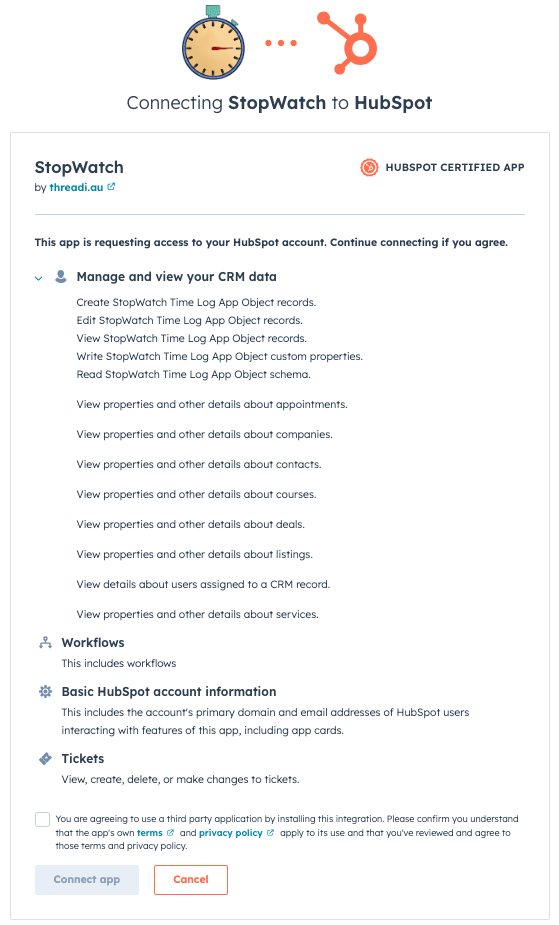
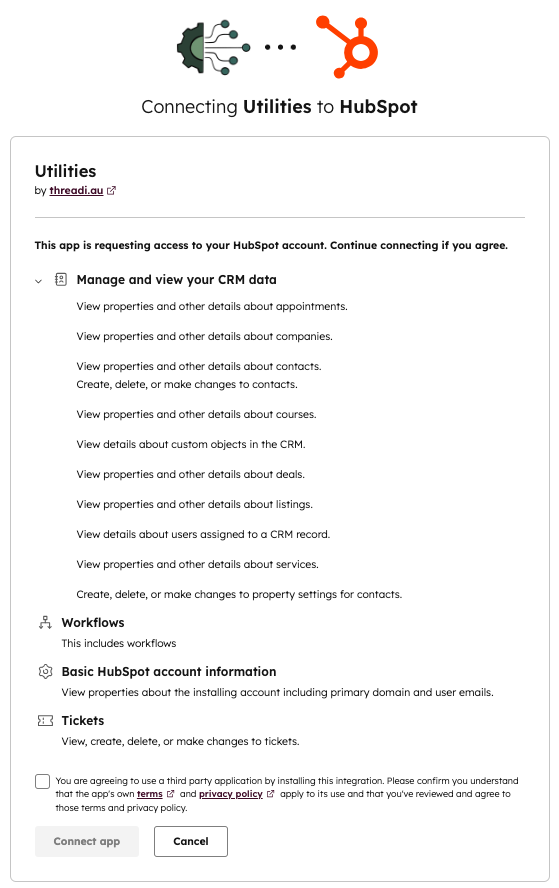
When you install our apps, you are required to grant the given app permission to access certain data in your HubSpot Portal. We only request app permission scopes that our apps **absolutely need** in order to provide our features and services.
Below are the required permission scopes requested by **StopWatch for HubSpot** at the time of install.
 Below are the required permission scopes requested by **Utilities for HubSpot** at the time of install.
 [Top of section](#app-permissions)
[Top of page](#security)
## Data Flows & Storage
We store minimal data on our systems, the great majority of which is retained for a maximum of 30 days (for issue identification and resolution purposes). Our HubSpot app design philosophy ensures as much data as possible is stored directly in HubSpot.
**Example Request Body**
```json theme={null}
{
"crm": {
"objectId": 1234567890, // crm record id
"objectTypeId": "0-1" // crm object type id
},
"location": "crm.record.sidebar", // location of app card
"extension": {
"appId": 123456, // hubspot app id
"appName": "StopWatch", // hubspot app name
"cardTitle": "StopWatch" // app card title
},
"user": {
"id": 987654, // hubspot user id (person accessing the app card)
"emails": [
"jane.doe@example.com.au", // hubspot user email(s)
"jane.doe+example@example.com.au"
],
"email": "jane.doe@example.com.au", // primary hubspot user email
"firstName": "Jane", // hubspot user first name
"lastName": "Doe", // hubspot user last name
"roles": [],
"teams": [],
"locale": "en-au" // hubspot user language setting
},
"portal": {
"id": 1122334455, // hubspot portal id (aka hubid)
"timezone": "Australia/Brisbane", // hubspot portal timezone setting
"dataHostingLocation": "eu1" // hubspot portal hosting location
}
}
```
```mermaid theme={null}
sequenceDiagram
Note over HubSpot: User views a CRM record
HubSpot->>App Backend (GCP): Contextual info (see example)
Note over App Backend (GCP): Logged for 30 days
App Backend (GCP)-->>HubSpot: Create/update HubSpot data
App Backend (GCP)->>HubSpot: Response
```
**Example Request Body**
```json theme={null}
{
"callbackId": "ap-1122334455-1234567890-2-0",
"origin": {
"portalId": 1122334455,
"userId": null,
"actionDefinitionId": 999999,
"actionDefinitionVersion": 1,
"actionExecutionIndexIdentifier": {
"enrollmentId": 1234567890,
"actionExecutionIndex": 1
},
"extensionDefinitionId": 999999,
"extensionDefinitionVersionId": 1
},
"context": {
"workflowId": 987654321,
"actionId": 2,
"actionExecutionIndexIdentifier": {
"enrollmentId": 1234567890,
"actionExecutionIndex": 1
},
"source": "WORKFLOWS"
},
"object": {
"objectId": 998877665544,
"propertyValues": {
"hubspot_owner_id": {
"name": "hubspot_owner_id",
"value": "987654",
"timestamp": 1739059581911,
"sourceId": "userId:987654",
"source": "CRM_UI",
"sourceVid": [],
"requestId": "123abc-123abc-123abc-123abc-123abc",
"updatedByUserId": 987654,
"useTimestampAsPersistenceTimestamp": true
}
},
"properties": {
"hubspot_owner_id": "987654"
},
"objectType": "TICKET"
},
"fields": {
"workflowTimeLog": "FALSE",
"timeLogOwner": "987654"
},
"inputFields": {
"workflowTimeLog": "FALSE",
"timeLogOwner": "987654"
},
"typedInputs": {
"workflowTimeLog": {
"value": "FALSE",
"type": "STRING"
},
"timeLogOwner": {
"value": "987654",
"type": "STRING"
}
}
}
```
```mermaid theme={null}
sequenceDiagram
Note over HubSpot: Custom Workflow Action invoked
HubSpot->>App Backend (GCP): Contextual info (see example)
Note over App Backend (GCP): Added to queue
Note over App Backend (GCP): Logged for 7 days
App Backend (GCP)->>HubSpot: Response
Note over App Backend (GCP): Request Accepted
Note over App Backend (GCP): Request Processed
App Backend (GCP)-->>HubSpot: Create/update HubSpot data
```
**Example Request Body**
```json theme={null}
{
"appId": "123456", // hubspot app id
"attemptNumber": "1", // webhook request number
"changeSource": "CRM_UI", // data change source
"eventId": "1234567890", // webhook event id
"isSensitive": false, // whether the request relates to a sensitive property
"objectId": "9876543210", // hubspot crm record id
"objectTypeId": "0-1", // hubspot crm object type id
"occurredAt": "1761054076119", // timestamp
"portalId": "1122334455", // hubspot portal id
"propertyName": "example_property", // hubspot property name
"propertyValue": "example property value", // hubspot property value
"sourceId": "userId:987654", // webhook source id
"subscriptionId": "332211", // webhook subscription id
"subscriptionType": "object.propertyChange" // webhook subscription type
}
```
```mermaid theme={null}
sequenceDiagram
Note over HubSpot: Webhook invoked
HubSpot->>App Backend (GCP): Contextual info (see example)
Note over App Backend (GCP): Added to queue
Note over App Backend (GCP): Logged for 7 days
App Backend (GCP)->>HubSpot: Response
Note over App Backend (GCP): Request Accepted
Note over App Backend (GCP): Request Processed
App Backend (GCP)-->>HubSpot: Create/update HubSpot data
```
See **[StopWatch API documentation](/apis/stopwatch)** for more information
```mermaid theme={null}
sequenceDiagram
API Consumer->>StopWatch API: Request w/ API key
Note over StopWatch API: Validate API key
StopWatch API->>HubSpot API: Request StopWatch Time Log data
HubSpot API-->>StopWatch API: Response
Note over StopWatch API: Data transformation
StopWatch API-->>API Consumer: Response
```
[Top of section](#data-storage)
[Top of page](#security)
[Top of section](#app-permissions)
[Top of page](#security)
## Data Flows & Storage
We store minimal data on our systems, the great majority of which is retained for a maximum of 30 days (for issue identification and resolution purposes). Our HubSpot app design philosophy ensures as much data as possible is stored directly in HubSpot.
**Example Request Body**
```json theme={null}
{
"crm": {
"objectId": 1234567890, // crm record id
"objectTypeId": "0-1" // crm object type id
},
"location": "crm.record.sidebar", // location of app card
"extension": {
"appId": 123456, // hubspot app id
"appName": "StopWatch", // hubspot app name
"cardTitle": "StopWatch" // app card title
},
"user": {
"id": 987654, // hubspot user id (person accessing the app card)
"emails": [
"jane.doe@example.com.au", // hubspot user email(s)
"jane.doe+example@example.com.au"
],
"email": "jane.doe@example.com.au", // primary hubspot user email
"firstName": "Jane", // hubspot user first name
"lastName": "Doe", // hubspot user last name
"roles": [],
"teams": [],
"locale": "en-au" // hubspot user language setting
},
"portal": {
"id": 1122334455, // hubspot portal id (aka hubid)
"timezone": "Australia/Brisbane", // hubspot portal timezone setting
"dataHostingLocation": "eu1" // hubspot portal hosting location
}
}
```
```mermaid theme={null}
sequenceDiagram
Note over HubSpot: User views a CRM record
HubSpot->>App Backend (GCP): Contextual info (see example)
Note over App Backend (GCP): Logged for 30 days
App Backend (GCP)-->>HubSpot: Create/update HubSpot data
App Backend (GCP)->>HubSpot: Response
```
**Example Request Body**
```json theme={null}
{
"callbackId": "ap-1122334455-1234567890-2-0",
"origin": {
"portalId": 1122334455,
"userId": null,
"actionDefinitionId": 999999,
"actionDefinitionVersion": 1,
"actionExecutionIndexIdentifier": {
"enrollmentId": 1234567890,
"actionExecutionIndex": 1
},
"extensionDefinitionId": 999999,
"extensionDefinitionVersionId": 1
},
"context": {
"workflowId": 987654321,
"actionId": 2,
"actionExecutionIndexIdentifier": {
"enrollmentId": 1234567890,
"actionExecutionIndex": 1
},
"source": "WORKFLOWS"
},
"object": {
"objectId": 998877665544,
"propertyValues": {
"hubspot_owner_id": {
"name": "hubspot_owner_id",
"value": "987654",
"timestamp": 1739059581911,
"sourceId": "userId:987654",
"source": "CRM_UI",
"sourceVid": [],
"requestId": "123abc-123abc-123abc-123abc-123abc",
"updatedByUserId": 987654,
"useTimestampAsPersistenceTimestamp": true
}
},
"properties": {
"hubspot_owner_id": "987654"
},
"objectType": "TICKET"
},
"fields": {
"workflowTimeLog": "FALSE",
"timeLogOwner": "987654"
},
"inputFields": {
"workflowTimeLog": "FALSE",
"timeLogOwner": "987654"
},
"typedInputs": {
"workflowTimeLog": {
"value": "FALSE",
"type": "STRING"
},
"timeLogOwner": {
"value": "987654",
"type": "STRING"
}
}
}
```
```mermaid theme={null}
sequenceDiagram
Note over HubSpot: Custom Workflow Action invoked
HubSpot->>App Backend (GCP): Contextual info (see example)
Note over App Backend (GCP): Added to queue
Note over App Backend (GCP): Logged for 7 days
App Backend (GCP)->>HubSpot: Response
Note over App Backend (GCP): Request Accepted
Note over App Backend (GCP): Request Processed
App Backend (GCP)-->>HubSpot: Create/update HubSpot data
```
**Example Request Body**
```json theme={null}
{
"appId": "123456", // hubspot app id
"attemptNumber": "1", // webhook request number
"changeSource": "CRM_UI", // data change source
"eventId": "1234567890", // webhook event id
"isSensitive": false, // whether the request relates to a sensitive property
"objectId": "9876543210", // hubspot crm record id
"objectTypeId": "0-1", // hubspot crm object type id
"occurredAt": "1761054076119", // timestamp
"portalId": "1122334455", // hubspot portal id
"propertyName": "example_property", // hubspot property name
"propertyValue": "example property value", // hubspot property value
"sourceId": "userId:987654", // webhook source id
"subscriptionId": "332211", // webhook subscription id
"subscriptionType": "object.propertyChange" // webhook subscription type
}
```
```mermaid theme={null}
sequenceDiagram
Note over HubSpot: Webhook invoked
HubSpot->>App Backend (GCP): Contextual info (see example)
Note over App Backend (GCP): Added to queue
Note over App Backend (GCP): Logged for 7 days
App Backend (GCP)->>HubSpot: Response
Note over App Backend (GCP): Request Accepted
Note over App Backend (GCP): Request Processed
App Backend (GCP)-->>HubSpot: Create/update HubSpot data
```
See **[StopWatch API documentation](/apis/stopwatch)** for more information
```mermaid theme={null}
sequenceDiagram
API Consumer->>StopWatch API: Request w/ API key
Note over StopWatch API: Validate API key
StopWatch API->>HubSpot API: Request StopWatch Time Log data
HubSpot API-->>StopWatch API: Response
Note over StopWatch API: Data transformation
StopWatch API-->>API Consumer: Response
```
[Top of section](#data-storage)
[Top of page](#security)
[Top of page](#security)